
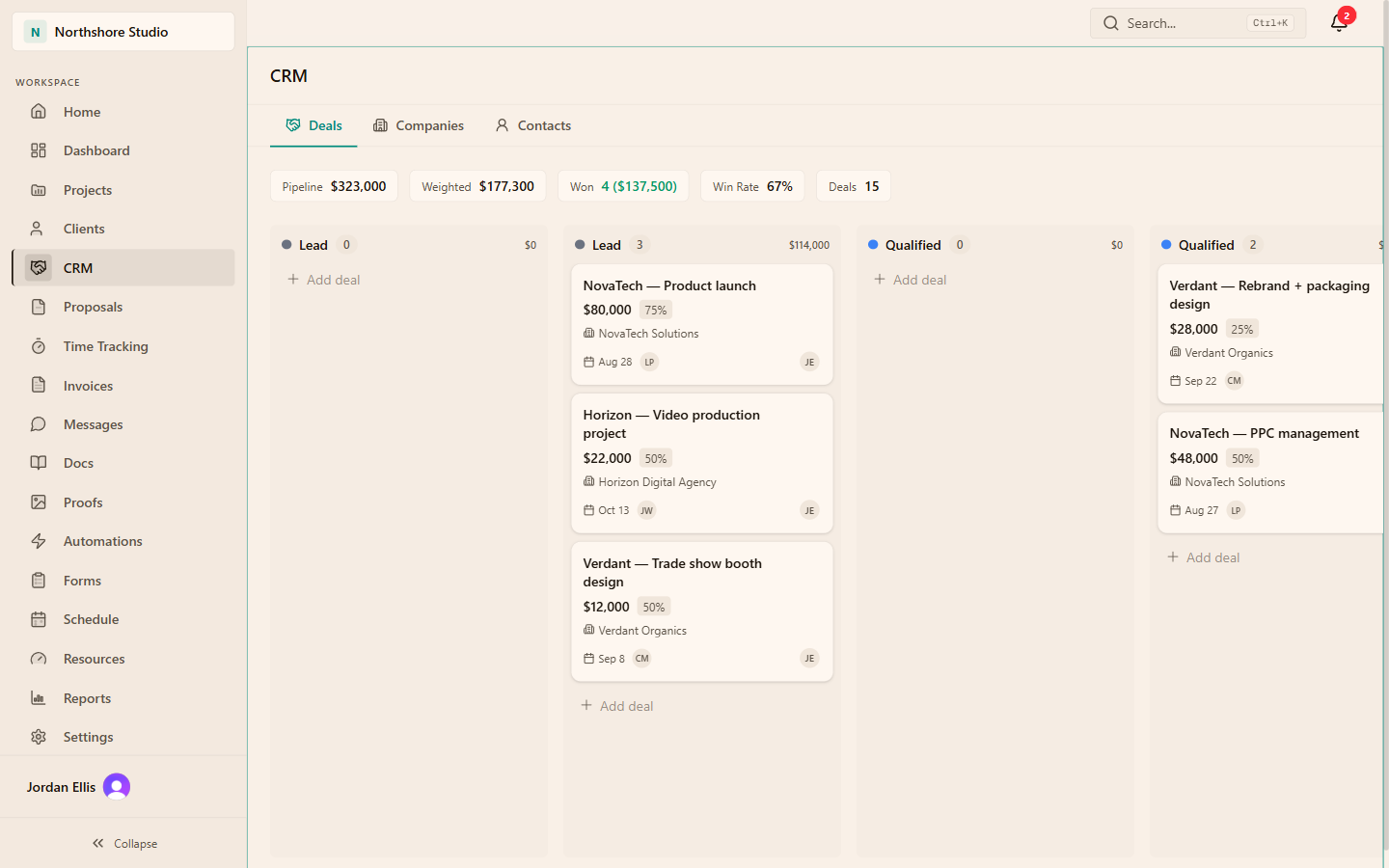
01 / CRM guide
Set up records in a useful order
The CRM has three tabs: Deals, Companies and Contacts. A company holds the organization: name, domain, industry, phone, address and notes. A contact is a person, with name, email, phone, job title, company and a source such as website, referral, LinkedIn, cold outreach, event or other. A deal is one opportunity, with a stage, contact, company, value, currency, probability, close date, owner and notes. One company can carry several deals over time.
Search before you add, then create the company, the contact and finally the deal. Linking the deal to a company matters later, because conversion uses the company to find or create the client for the new project. A deal with only a contact converts into a project with no client attached.
02 / CRM guide
Agree what each stage means
Workspaces start with six stages: Lead, Qualified, Proposal, Negotiation, Won and Lost. The pipeline is built around this set rather than custom columns you add yourself. The practical work is agreeing an entry rule for each stage, so a card's position means the same thing to everyone reviewing it. The rules below are an illustrative starting point, not product settings.
| Stage | Illustrative entry rule | Next action to record |
|---|---|---|
| Lead | A named person has a plausible need | Book a discovery call |
| Qualified | Budget owner, timing and fit confirmed | Draft the scope |
| Proposal | A proposal has been sent | Agree a review date |
| Negotiation | Terms or scope are being adjusted | Resolve the open terms |
| Won | The client has accepted | Convert and brief delivery |
| Lost | The client said no or went silent past a set date | Record the reason |
03 / CRM guide
Read the pipeline figures correctly
The bar above the board shows Pipeline, Weighted, Won, Win Rate and Deals. Pipeline adds the value of deals in open stages, so Won and Lost are excluded. Weighted multiplies each open deal's value by its probability, and a deal with no probability counts at 50%. Won shows the number and value of deals in the Won stage. Win Rate divides won deals by won plus lost deals currently in those stages.
Illustrative example with assumed deals: $20,000 at 75% contributes $15,000, $10,000 with no probability contributes $5,000, and $8,000 at 25% contributes $2,000. Pipeline is $38,000 and Weighted is $22,000. If the $10,000 deal is really a long shot at 10%, Weighted drops to $18,000. Set probability deliberately. Weighted value is a planning signal, not a revenue or cash forecast.
By default, deal values are visible to owners and admins. Other roles see the deals, stages and probability without the money columns, so a manager can run the pipeline without seeing values.
04 / CRM guide
Keep an activity trail people can use
Open a deal and use Add Activity to record a note, call, email or meeting. These entries are a record, so logging an email does not send one. Stage changes and value changes are added to the timeline automatically, which shows when a deal stalled or its value moved. A useful entry says what was agreed and what happens next, with a date.
Run a short weekly review from the board rather than from memory.
Sweep stale deals
Open any deal without a recent activity and record the next action or move it to Lost with a reason.
Check values and probability
Confirm the value still matches the scope under discussion and the probability reflects evidence, not optimism.
Confirm close dates
Update close dates that have passed. A date in the past quietly weakens every forecast built on it.
Flag capacity early
For deals likely to close this month, tell delivery the expected start and rough effort so the team can plan capacity.
05 / CRM guide
Convert a won deal into a project
Open the deal, open its options menu, then choose Convert to Project. By default, owners, admins and managers can convert. The dialog proposes the deal title as the project name and the deal notes as the description. Conversion creates an active, internal project with an hourly billing type and the deal value as its budget. It links the company's client, or creates a client from the company name and links it for next time. The deal moves to Won if it is not there already, a conversion entry is added to its timeline and the deal then shows View Project. A deal can be converted once.
Managers can convert even though, by default, they do not see deal values, so the dialog may show the budget as Not set. The project still receives the deal value as its budget.
- Change the billing type if the work is fixed fee or retainer.
- Check the budget against the accepted proposal, not the first estimate.
- Add the team and confirm rates before anyone logs time.
- Make the project client-visible only when the portal is ready for the client.
- Allocate weekly capacity for the people starting first.
06 / CRM guide
Proposals, automations and boundaries
A signed proposal linked to a deal moves that deal to Won, but it does not convert it. The Deal Won automation trigger fires when someone moves a deal into Won by changing its stage. A signature or a conversion that moves the deal does not fire it, so use the Proposal Accepted trigger for signature-driven workflows.
The CRM tracks relationships and opportunities. The CRM is not a contact database, inbox sync or outbound sequence tool. Keep email sequences and deliverability in your sending tool.
THE PRACTICAL DETAILS
Questions, answered.
Can we add our own pipeline stages?
The pipeline uses six standard stages: Lead, Qualified, Proposal, Negotiation, Won and Lost. Rather than adding columns, agree an entry rule for each stage so cards mean the same thing to everyone.
Why is the weighted value higher than we expected?
Open deals without a probability count at 50%. Set a probability on every open deal and the weighted figure will reflect your own judgement.
Does logging an email activity send the email?
No. Note, call, email and meeting activities are records on the deal timeline. Send the email from your mail client and log what was said.
What does converting a deal create?
An active, internal project with an hourly billing type, the deal value as budget and a client taken from the deal's company. Staffing, rates, tasks and the billing type still need your review.
Who can see deal values?
By default, owners and admins. Other roles see deals, stages and probability without values, and the pipeline bar hides its money figures for them.